[BOGOF]Buy One, Get One Free on Love Sofa - Type O

BOGOF Sale is Over. Thanks for your support!

Love Sofa - Type O sells over 10.000 copies (10.127 at this time) only on SL Marketplace. In celebration of this big sales, OBF is now having Buy One Get One Free Sale.
Rules:
  • Buy Love Sofa - Type O via SL Marketplace: It already has 1 plus 1 (2 copies). Jump to the page on SL Marketplace.(Sale is over.)
  • No 50% discount for purchasing one copy.

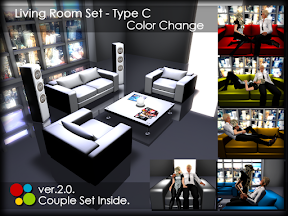
[TINY UPDATE] Living Room Set - Type B / C : Reduced the Land Impact with Convex Hull

Living Room Set - Type B - ver.4.01
:Total Land Impact Reduced from 55 to 51.
  • Side Table - Type A suede: reduced from 4 to 2. 
  • Low Table - Type B suede: reduced from 4 to 2.

Living Room Set - Type C - ver.2.01
:Total Land Impact Reduced from 44 to 40.
  • Tall Speaker L / R: reduced from 5 to 3 each.


If You Already Have These Items.
Set [Physics Shape Type:] of the item to "Convex Hull".

[UPDATE]Urban Skybox v3: Reduced the Land Impact to ONLY 4 / Added More Texture...

Urban Skybox - ver.3.0.
What's Updated.
ver.3.0 / January 4, 2014.
  • Reduced the Land Impact from 13 to ONLY 4.
  • Added More View: Total 25 types of big cities and natural scenes.
  • Added More Graffiti for a Back Wall: Total 11 types.
  • Added More Interior / Exterior Wall: Total 12 / 2 types.
  • Added 2 More Floor Texture: Total 7 types.
ver.1.9 / April 2, 2010.
  • 2 Wall Textures Added: Brick02 and Brick03.
  • 2 Types of Shadow on Floor Texture Added: Noon and Evening.
  • Script Improved: Low Lag, No Errors.

Get Your Update If You Already Purchased.
Contact me "Haruka Ackland" via IM or e-mail.


Related Item.

Wine Server

This Item Is Included In
Dining Table Set - TYPE B with Food Rezzing Placemat.
:::OBF::: Wine Server
Features:
  • Only 2 Prims. 
  • Wine Glass Rez with Pouring Sound. 
  • Red and White Wine with Drinking Animation for Male and Female. 
Prims: 2
Permissions: copy / NO mod / NO trans

GET A GLASS OF WINE
Click "Wine Server" to open menu. And choose wine according to your sex (M / F). Wine glass will be appeared in front of a bottle (/ logo on wine cooler) with pouring sound. Click it to get a wearable one with drinking animation.
*Rezzed wine glass will be deleted automatically after 1 minute or clicking.

RE-POSE FEATURE
Click the glass which you are holding to retake holding-glass posture.


You May Also Be Interested In...

[UPDATE] Reading Stump: Added Couple Animation / Reduced Prim Counts...

Reading Stump (GroundTex Change) - ver.2.0.
What's Updated.
March 1, 2013.
  • Reduced Total Prim Count from 7 to 5.
  • Replaced and Added Animation: 18 different types of animation (2 sets for reading / 7 sets for couple.) 
  • Swap Feature: No need to reseat yourself if you sit in the wrong position.
  • Prop Feature: Auto-rez (/derez) 1Prim Book / Auto-give a cup of Coffee.
  • Restricted Owner Menu: to reset pose system, turn off facial expressions and set access mode (Owner / Group / Public).
Couple Animation in ver.2.0.

Get For Free at the Inworld Store.
It remains in Lucky Letter Board as a prize.
And also it's on sale for time-saving and a gift on Second Life Marketplace.

[UPDATE] Love Sofa - Type O: Replaced & Added Animation / Swap & Prop Feature...

Love Sofa - Type O (Texture Change) - ver.2.0.
What's Updated.
February 9, 2013.
  • Replaced and Added Animation: 49(+4) different types of animation (11 sets for Single / 14 Sets for Couple.)
  • Swap Feature: No need to reseat yourself if you sit in the wrong position. (Click anywhere to open pose menu.)
  • Prop Feature: Auto-rez (/derez) 1Prim Laptop and Book / Auto-give Alienbacks Coffee.
  • 9 More Color Variations (14 textures total.)
  • Free Tinting with Color Picker HUD.
  • Restricted Owner Menu: to reset pose system, turn off facial expressions and set access mode (Owner / Group / Public).

Get Your Update If You Already Purchased.
Please send your object to "Haruka Ackland" WITH IM. I shall send newer version back to you a.s.a.p.

1Prim Sideboard - TYPE A (Color Change)


:::OBF::: 1Prim Sideboard - TYPE A (Color Change)
Features:
  • Only 1 Prim.
  • 11 Colors. (White / Silver / Black / Red / Fuchsia / Indianred / Olive / Olivedrab / Turquoise / Skyblue / Gold)
  • Comes with a Shadow Prim.
Prim: 1
Permissions: copy / mod / NO trans

Cuddle Round Sofa - Type B (Texture Change)

:::OBF::: Cuddle Round Sofa - Type B (Texture Change)
Features:
  • Only 2 Prims / 2-seater.
  • 6x2 Animations for Single / 5x2 for Alone / 13 Sets for Couple.
  • Swap Feature: No need to reseat yourself if you sit in the wrong position.
  • 1Prim Laptop and 1Prim Book will be automatically rezzed / derezzed.
  • 12 Types of Textures.
Prims: 2
Permissions: trans / NO mod / NO copy


CHANGE POSE
/ ADJUST SITTING POSITION

Click a sofa to open menu.
  • 2-seater.
  • [Single Sits]: 6 animations on the left and right each.
  • [Alone M / F]: 5 animations for male and female each.
  • [Couple M / F]: 13 sets of couple animation.*1
  • [SWAP]: Swap a seat without reseating yourself.
  • [ADJUST]: Up to the last 400 user's personal adjustments (position / rotation) will be stored until the memory is full.*2
*1. Couple pose / animation will synchronize.
*2. at which point the oldest 10 are removed to make room for new ones. (the owner's adjustments take memory storage priority).


OPTIONS
WITHOUT SITTING, RIGHT CLICK on a sofa and CHOOSE "TOUCH" from context menu.
  • [Texture]: 12 textures.
  • [Shadow]: Show / Hide shadow.

TINT WITH COLOR PICKER HUD
Attach ":::OBF::: Color Picker HUD" (default on Top-left) and click color palette. You can freely pick up color, like on Second Life edit tool.

RESTRICTED OWNER MENU
LEFT-CLICKHOLD on a sofa to open menu. (OWNER ONLY).
  • [Access]: Toggle sitter access mode (Owner / Group*3 / Public).
  • [Expressions]: Toggle facial expressions (On / Off).
  • [Reload MPS]: Reset pose system scripts.
  • [Save Prop / Reset Prop]*4: Reposition and record props by using the Second Life build tool.
*3. While in group mode, the group allowed is determined by the one set for the object.
*4. This options will appear while props are rezzed.


To set an object to the group:
  1. Right-click the object and select "Edit".
  2. Under the "General tab", click the Edit [Wrench] button.
  3. Select a group. The object is set to this group.
And a sitter needs to activate the appropriate group to sit.

To activate the group tag:
  1. Select "Communicate" > "My Groups" from the menu at the top of the Viewer.
  2. Right-click on the name of the group you wish to make active.
  3. Click "Activate".
  4. The group name changes to bold to indicate that it is active.

OBF is Participating in Make Home Over Hunt I

off-brand furniture is taking part in Make Home Over Hunt I. Get a hint from the hunt poster at inworld store, and look for the hunt object: Green Earth Symbol.


Duration: April 5 - May 5.
Information: Check Make Home Over blog.

Unfortunately OBF doesn't make new stuff ready for this hunt due to troubles in real life. But it must show up if it is complete by the end of the hunt. Keep your eyes on this blog.

[UPDATE]Living Room Set - Type B: Couple Set Added / More Single Pose...

Living Room Set - TYPE B (Color Change) - ver.4.0


What's Updated?
March 7, 2012
ver.4.0.
  • Couple Set Added: 19 different sets.
  • More Single Pose: 39 different poses total.
  • Menu Driven: Change pose, adjust sitting position with menu.
  • Texture "Smooth" for Sofa Added.
リンク
August 3, 2010
ver.3.0.
  • Leather Sofa Retextured: Default cream leather. And more 6 new colors by texture editing come.
  • 12 Textures for Pillows Added: Menu controlled.
  • Tint System Changed: No need to say chat command, just simply click. 7 colors available with dialog menu. (Cream, Mocha, Black, White, Red, Green and Blue)
  • Modify Permission Granted: For free tinting with edit tools.
  • Some Poses Modified: For smooth switching.
  • Ashtray Retextured: And wearable cigarette remodeled with new smoking animation.
  • Magazines and Book Replaced: With single prim sculpted one.
  • Cube Lamp: Reduced 2 to 1 Prim.
  • Total Prim Count: Reduced 59 to 55 Prims total.


Get Your Update If You Already Purchased.
Please send your living room set to "Haruka Ackland" WITH IM. I shall send newer version back to you a.s.a.p.


Check this post for more information.

[UPDATE]Freebie! Cuddle Cardboard Box: Couple Sets Added / 1Prim Laptop Rez...

Get it for free at OBF inworld store!

Check this post for more information.

Features:
  • Purely Freebie!
  • 3x3 Animations for Single / 6 Sets for Couple.
  • Swap Feature: No need to reseat yourself if you sit in the wrong position.
  • 1Prim Laptop will be automatically rezzed when you choose "CheckBlog" sets.

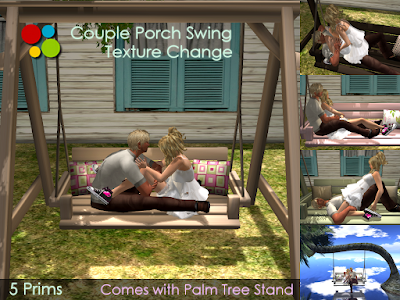
Couple Porch Swing - Type B (Texture Change)


:::OBF::: Couple Porch Swing - Type B (Texture Change)

Features:
  • Porch Swing (3 Prims) Comes with Swing Stand (2 Prims) / Palm Tree Stand (3 Prims).
  • Smooth Swinging While Sitting.
  • 4x2 Animations for Single / 3x2 for Alone / 13 Sets for Couple.
  • Swap Feature for Couple: No need to reseat yourself if you sit in the wrong position.
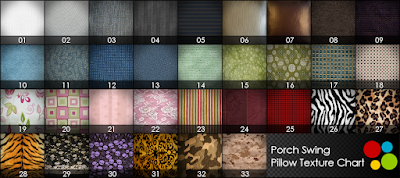
  • 14 Types of Textures for Swing / 33 for Pillows.
Prims: 5
Permissions: trans / NO mod / NO copy


CHANGE POSE
/ ADJUST SITTING POSITION
Click a swing to open menu.
  • 2-seater.
  • [Single Sits]: 4 animations on the left and right each.
  • [Alone M / F]: 3 animations for male and female each.
  • [Couple M / F]: 13 sets of couple animation.*1
  • [SWAP]: Swap a seat without reseating yourself.
  • [ADJUST]: Up to the last 400 user's personal adjustments (position / rotation) will be stored until the memory is full.*2
*1. Couple pose / animation will synchronize.
*2.
at which point the oldest 10 are removed to make room for new ones. (the owner's adjustments take memory storage priority).


OPTIONS
SWING:
WITHOUT SITTING, click a rope to open menu.
  • [Swing]: 14 textures.
  • [Pillows]: 33 textures.


STAND:
Click shadow of a stand to open menu.
  • [Stand]: 14 textures.
  • [Shadow]: Show / Hide shadow.

STAND - PALM TREE:
Click palm leaves to open menu.
  • [Sound]: 3 types of wave sound. (Lakeshore / Seashore1 / Seashore2).
  • [OFF]: Turn off wave sound.
  • [Shadow]: Show / Hide shadow.


TINT WITH COLOR PICKER HUD
Attach ":::OBF::: Color Picker HUD" (default on Top-left) and click color palette. You can freely pick up color, like on Second Life edit tool.


RESTRICTED OWNER MENU
LEFT-CLICKHOLD on a swing to open menu. (OWNER ONLY).
  • [Access]: Toggle sitter access mode (Owner / Group*3 / Public).
  • [Expressions]: Toggle facial expressions (On / Off).
  • [Reload MPS]: Reset pose system scripts.
*3. While in group mode, the group allowed is determined by the one set for the object.

To set an object to the group:
  1. Right-click the object and select "Edit".
  2. Under the "General tab", click the Edit [Wrench] button.
  3. Select a group. The object is set to this group.
And a sitter needs to activate the appropriate group to sit.

To activate the group tag:
  1. Select "Communicate" > "My Groups" from the menu at the top of the Viewer.
  2. Right-click on the name of the group you wish to make active.
  3. Click "Activate".
  4. The group name changes to bold to indicate that it is active.


[UPDATE]Couple Picnic Table: Error Removed / Swap Feature...


Couple Picnic Table - Type B2 (Texture Change) - ver.2.0.

What's Updated.

November 1, 2011.
  • "No room to sit..." error removed.
  • Total Prim Count Raised from 4 to 6: to avoid "No room to sit..." error, and maintain usability.
  • Swap Button Feature: No need to reseat yourself if you are in the wrong position.
  • Some of Poses Got Facial Expressions. (Owner can turn it off.)
  • Restricted Owner Menu: to reset pose system, turn off facial expressions and set access mode (Owner / Group / Public).

Get Your Update If You Already Purchased.
Please send your object to "Haruka Ackland" WITH IM. I will send the latest version back to you a.s.a.p.


Check this post for more information.

1Prim Decorative Magazine (Cover Change)

:::OBF::: 1Prim Decorative Magazines (Cover Change) Features:
  • Only 1 Prim for 4 Sets of Magazines.
  • 6 Covers (Modish / Design / Art / Fashion / Pursuit / Gamer).
  • Comes with a Shadow Prim.
Prims: 1
Permissions: copy / mod / NO trans

Square
Wedge
Vee

Cuddle Hipbar - Type A (Texture Change) - ver.2.0.

Prize for On The Hunt from Sep. 20 to Oct. 20, 2011.
:::OBF::: Cuddle Hipbar - Type A (Texture Change)
- ver.2.0.
 Features:
  • Only 2 Prims / 2-seater.
  • 2+2 Types of Single Pose. / 5 Sets of Couple Pose.
  • Swap Feature for Couple: No need to reseat yourself if you sit in the wrong position.
  • 2 Types of Texture / 7 Color Variations.
  • 4 Types of Shadow Shape and "Hide" Feature.
Prims: 2
Permissions: copy / NO mod / NO trans


CHANGE POSE / ADJUST SITTING POSITION
Click a bar to open menu.
  • 2-seater.
  • [Single Sits]: 2 different types of single pose on the left and right each.
  • [Couple M / F]: 5 sets of couple pose.*1
  • [SWAP]: Swap a seat without reseating yourself.
  • [ADJUST]: Up to the last 400 user's personal adjustments (position / rotation) will be stored until the memory is full.*2

*1 Couple pose / animation will synchronize.
*2 at which point the oldest 10 are removed to make room for new ones. (the owner's adjustments take memory storage priority).

OPTIONS
WITHOUT SITTING, RIGHT CLICK on a bar and CHOOSE "MENU" from context menu.
  • [Texture]:  2 textures (Metal / with Rubber).
  • [Color]: 7 colors (Silver / Gold / Ruby / Topaz / Peridot / Amethyst / Titanium).
  • [Shadow]: 4 shapes (Under / Center / Right / Left / [Hide]).


RESTRICTED OWNER MENU
LEFT-CLICKHOLD on a swing to open menu. (OWNER ONLY).
  • [Access]: Toggle sitter access mode (Owner / Group*3 / Public).
  • [Reload MPS]: Reset pose system scripts.
*3 While in group mode, the group allowed is determined by the one set for the object. To set an object to the group:
  1. Right-click the object and select "Edit".
  2. Under the "General tab", click the Edit [Wrench] button.
  3. Select a group. The object is set to this group.
And a sitter needs to activate the appropriate group to sit.
To activate the group tag:
  1. Select "Communicate"  > "My Groups" from the menu at the top of the Viewer.
  2. Right-click on the name of the group you wish to make active.
  3. Click "Activate".
  4. The group name changes to bold to indicate that it is active.

OBF Paticipates in On The Hunt - Second Lifes Premiere Hunt

OBF off-brand furniture participates in "On The Hunt - Second Lifes Premiere Hunt" which will be held from Sep. 20 to Oct. 20, 2011.


OBF supplies a brand new stuff has completed 2 days ago for this hunt. Please look for a tiny magnifying glass at inworld store. You will get a special prize and LM to the next store. (Official store order of OBF is #55.)


OBF Prize
:::OBF::: Cuddle Hipbar - Type A (Texture Change): 2 Prims


Hunt Clue for OBF
"I always try to do my best!".


Official Starting Point
#1 - On The Hunt - Headquarters (slurl)
Get the hunt hints from On The Hunt - Headquarters.


Check OTH official blog for more information.

Have fun!